
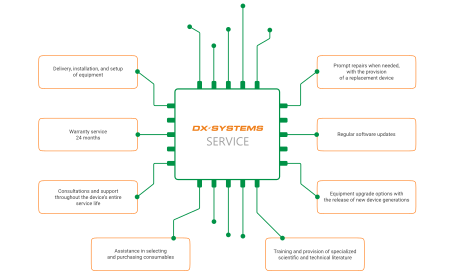
Доставка монтаж і
налагодження

Гарантійне обслуговування  мінімум 24 місяці

Консультації та підтримка протягом  усього терміну експлуатації
приладу

Ремонт у разі потреби у найкоротші  терміни з наданням підмінного приладу

Постійні оновлення програмного забезпечення

Можливість модернізації| обладнання після виходу нових поколінь приладів

Допомога у підборі та закупівлі витратних матеріалів

Інструктаж та постачання спеціальної наукової та технічної літератури

Questions & Answers

How to Prepare for Installation?
  1. Prepare the Examination Room:
  • Power supply.
  • The preferred option is a dedicated power line from the distribution board, with no other devices connected. Proper grounding must be ensured (not neutralization). Alternatively, a grounded outlet is acceptable if the building’s electrical system is correctly installed.
  • Lighting. The room should allow for dimming of both daylight and artificial light (required for EEG and EP studies). The use of fluorescent lamps is not recommended, as they may cause signal
  • Doctor’s workstation. Desk for a desktop computer or laptop, and a chair.
  • Patient area. Couch (for EMG). Chair with full neck and leg relaxation support (for EEG and EP). Bed, if sleep monitoring is planned.
  • Device placement.
  • The device should be positioned as far as possible from power cables and high-consumption electrical equipment, at a distance of no less than 5 m. In special cases (e.g., proximity to MRI or X-ray systems), the device must be relocated to another room.
  1. Prepare the PC for Software Installation (if computer equipment is not included in the supply agreement, please arrange purchase in advance):
  • Recommended specifications: Intel Core i5, 3.2 GHz / 16 GB RAM / 512 GB SSD.
  • If another configuration is used, please confirm specifications with our technical support.
    Additional requirements:
  • Stable internet connection.
  • Remote access software.
  • Viber or Telegram.
  • 24″ monitor (recommended even when if using a laptop); an additional monitor is required for EMG with EP mode using a reverse chess pattern.
  • Printer.
  • Phillips screwdriver and hex keys (4 and 5 mm).

Various types of noise (artifacts) can appear in EEG recordings. These are not related to brain activity and can distort the results. The main causes include:

  1. Biological artifacts (patient-related):
  • Muscle activity (EMG artifacts) – facial tension, chewing, smiling, jaw clenching.
  • Eye movements and blinking – create large slow waves that may resemble pathology.
  • ECG artifacts: cardiac electrical activity visible on the EEG.
  • Breathing, coughing, body movements – cause fluctuations in the recording.
  • Sweating affecting electrode contact, resulting in slow waves.
  1. Technical artifacts (equipment-related):
  • Power-line interference (50 Hz).
  • Poor cable shielding
  • Mechanical vibrations of equipment or cables.
  1. External factors:
  • Nearby metal objects, mobile phones, or electrical devices.
  • Insufficient electromagnetic shielding of the room.
Noise typeAppearance on EEGCause
Blinking, eye movements (EOG)Large slow waves, in frontal leadsEye opening/closing, eye movement
Muscle activity (EMG artifacts)Fast spike-like waves, high-frequency background activityFacial muscle tension, chewing, talking
Cardiac artifact (ECG)Rhythmic waves synchronized with heart rateElectrical activity of the heart
Body movements, coughing, breathingIrregular waveforms, baseline driftTrunk or shoulder movements, breathing
SweatingSlow waves, signal instabilityMoist skin, change in impedance
Poor electrode contactSpikes, flashes, shiftsHigh impedance, dried gel, electrode displacement
Power line interferenceSinusoidal waves at 50 HzElectrical devices, insufficient shielding
Mechanical artifactsIrregular oscillations, noiseCable movement, device vibration
  1. Patient Preparation
  • Explain the importance of relaxation and remaining still during the recording.
  • Hair should be clean and free of styling products.
  • If possible, avoid caffeine, energy drinks, and medications (as approved by the doctor) before the examination.
  1. Control of Biological Artifacts
  • The patient should not chew or clench the jaw during the recording.
  • Ensure a comfortable sitting or lying.
  • Confirm that the patient can remain calm with eyes closed.
  1. Electrode Handling
  • Use fresh conductive gel or
  • Maintain electrode impedance <5 kΩ, with minimal variation between electrodes.
  • Secure electrodes firmly while maintaining patient
  1. Technical Considerations
  • Turn off mobile phones and unnecessary electrical
  • Use shielded cables and ensure correct grounding of the device.
  • Prevent any cable movement during signal acquisition.
  1. Room Conditions
  • Maintain a quiet environment with dimmed lighting.
  • Ensure a comfortable room temperature to prevent sweating.
  • Minimize distractions.
  1. Biological Artifacts (Patient-Related):
  • Patient movements – even minimal body movements can cause significant distortion of the EMG
  • Tremor, muscle tension – produce high-frequency “noise” that may obscure genuine muscular
  • Cardiac artifact (ECG) – electrical potentials of the heart may sometimes overlap with EMG.
  • Cross-talk from neighboring muscles – when electrodes pick up signals from other muscles.
  1. Technical Artifacts (Equipment-Related):
  • Poor electrode contact (inedaquate skin preparation, dried conductive gel, electrode displacement).
  • Power line interference (50/60 Hz).
  • Mechanical vibrations and cable movement can generate noise during registration.
  1. External Factors:
  • Nearby electrical devices.
  • Insufficient room shielding.
Noise typeAppearance on EMGCause
Biological: patient movementsIrregular wavesInsufficient muscle relaxation, body movements
Tremor, muscle tensionFast oscillationsInvoluntary muscle activity
Cardiac artifact (ECG)Rhythmic waves synchronized with heart rateHeart activity
Cross-talk from neighboring musclesAdditional oscillationsSignal pickup from adjacent muscles
Poor electrode contactSpikes, signal distortionWeak skin contact
Power line interferenceSinusoidal waves at 50/60 Hz

Electrical devices, inadequate grounding

Cable movement, mechanical vibrationsIrregular oscillationsMechanical interference
  1. Patient Preparation
  • The patient should be in a relaxed state.
  • If possible, avoid caffeine and other stimulants before the examination.
  • The skin at electrode application sites should be clean and free of oils.
  1. Control of Biological Artifacts
  • The patient should sit/lie still and avoid movement throughout the recording.
  • Ensure there is no excessive muscle tension.
  • In cases of tremor, recordings should be performed in short series, taking the patient’s condition into account.
  1. Electrode Handling
  • Use fresh conductive gel or
  • Clean the skin thoroughly with alcohol or gel before electrode placement.
  • Ensure reliable contact and secure electrode placement.
  1. Technical Considerations
  • Turn off nearby electrical devices and mobile phones.
  • Use shielded cables and proper grounding of the system.
  • Make sure cables remain stationary during recording.
  1. Room Conditions
  • Maintain quiet environment with minimal distractions.
  • Ensure a comfortable temperature to prevent
  • Position the patient comfortably to avoid involuntary movements.

Request a Consultation

When you purchase medical equipment from our company, you automatically gain unlimited access to consultations on all aspects of operating our devices.

You can contact us in any convenient way: by phone at  +38 (067) 572-49-49, by email, or via messaging apps.

Have Questions?

Speak with our experts and get professional guidance.

Request a call